Best alternative
The best PrintYourBrackets alternative
If you've been using PrintYourBrackets to download a PDF and fill it in by hand, the closest replacement is My Bracket App. Same no-signup, prints-clean approach — but instead of a folder of static PDFs, you get an interactive editor that auto-seeds the bracket, advances winners as you score, and works just as well on a phone as it does on paper.
This article is the opinionated take. For a strictly feature-by-feature breakdown, see the neutral comparison page.

Senior Sports Journalist & Match Analyst · Updated May 31, 2026
Short answer
My Bracket App is the best PrintYourBrackets alternative for most people.
It keeps everything that made PrintYourBrackets useful — no account needed, clean print output, free — and adds the things a decade-old static-PDF library can't do: live score tracking, automatic winner advancement, one editor that handles every team count from 3 to 64, themes you can swap with a click, and a mobile experience that doesn't require downloading anything.
Why people look for an alternative
What the static-PDF approach can't do
PrintYourBrackets pioneered the "just give me a clean printable bracket" corner of the internet, and it's still good at that job. The reason searches like "PrintYourBrackets alternative" keep climbing is that the workflow stops at the paper. Once the tournament starts, you're manually crossing out names, taping the sheet to a wall, and rewriting the bracket if a team drops out. People who organise tournaments more than once usually want a bit more from the tool.
- Manual score tracking. Every match is a pen mark; there's no way to undo a mistake without scribbling.
- One PDF per team count. Show up with 13 teams instead of 16 and you're digging for the right file.
- No live URL.If friends ask for the bracket, you're photographing paper.
- No phone editing. Scorer's table on a tablet is awkward; download-and-print doesn't survive the move to mobile.
- Round-robin and league play. Multi-week leagues need standings, not a knockout sheet.
What you get instead
Six things My Bracket App does that a PDF can't
Interactive editor, not a folder of PDFs
PrintYourBrackets is fundamentally a template library: you find a PDF that matches your team count, download it, and fill it in by hand. My Bracket App is an editor — you paste in team names, pick a format, and the bracket builds itself in the browser. Same result on paper, but the editor handles seeding, byes, and round labels automatically.
Scores auto-advance the winner
On a static PDF, every round means crossing out the loser and writing the winner one slot to the right. With My Bracket App, you type a score into the match cell and the winner appears in the next round. By the final, the bracket has filled itself in.
One tool for every team count
Need a 13-team bracket because two teams dropped out? Or a 23-team draw because everyone showed up? PrintYourBrackets has separate PDFs for each. My Bracket App handles 3 to 64 teams in one editor — change the count and the bracket re-balances with the right bye placement.
Works on a phone
If you're picking the bracket in a bar, at a tailgate, or on a 7-inch tablet at scorer's table, the PDF approach falls down quickly. The editor is designed mobile-first: tap into a cell, type a score, swipe between rounds.
Themes you can swap with one click
Pick a clean two-tone look, a sport-themed design, or a high-contrast print theme. No PDF re-download required — toggle and re-print.
Bracket + schedule + pool, same tool
My Bracket App also runs round-robin leagues, football squares, NFL pick'em, and printable team schedules. PrintYourBrackets covers some of these via separate template libraries; here it's the same editor.
What the editor produces
Same printable output, generated live
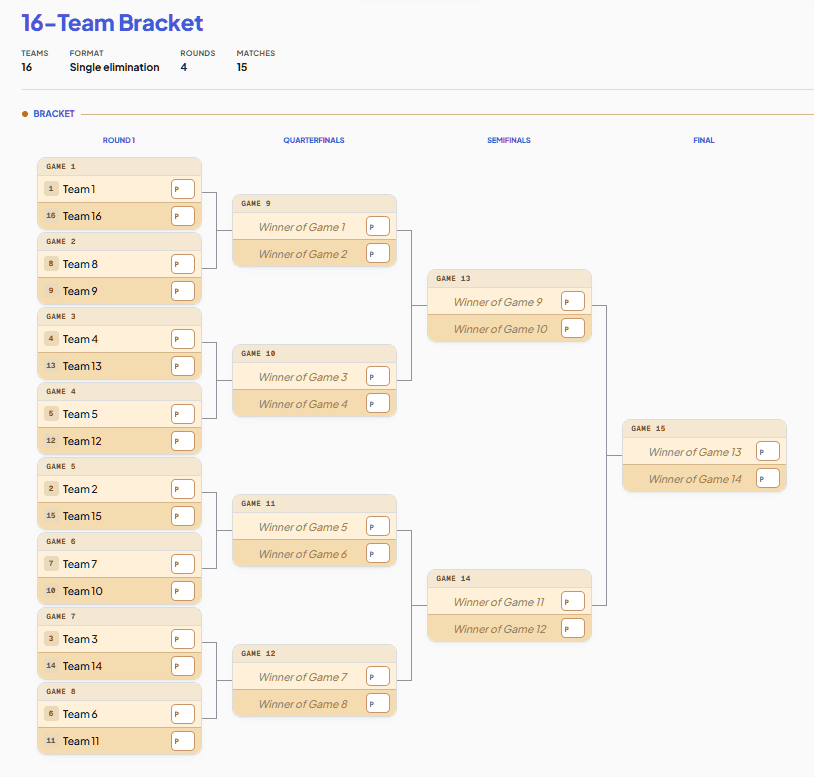
The bracket below is from the editor at /editor/tournament-bracket. It prints one-page wallchart-style, photocopies cleanly, and updates automatically as scores are entered.
Hands-on
Same bracket, two workflows
Say it's the office March Madness pool and you've got 16 teams. Here's what each tool asks of you.
PrintYourBrackets
Search → download → print → write
- Find the 16-team single-elim template in their library.
- Download the PDF.
- Print it.
- Write all 16 team names by hand into the brackets.
- As games happen, cross out losers and rewrite winners one column over. Repeat for 4 rounds.
- Someone asks for an update — photograph the paper, post in the chat.
My Bracket App
Paste → generate → score → share
- Open /editor/tournament-bracket.
- Paste 16 team names. Click Generate.
- Print to PDF if you want a paper copy — bracket is fully filled in, with proper seeding and round labels.
- As games happen, type the scores. Winners advance to the next round automatically.
- Share the URL in the group chat — anyone clicking sees the current state of the bracket.
Feature comparison
Side by side
| Feature | My Bracket App | PrintYourBrackets |
|---|---|---|
| How brackets are made | Interactive editor — paste team names, generate, score, print. | Static PDF templates — download the one that matches your team count. |
| Signup required | No. Account only saves to a dashboard. | No. |
| Score tracking | Type score, winner auto-advances. Standings track themselves. | Pen and paper. Cross out the loser, write the winner one slot right. |
| Team count flexibility | 3 to 64 in one editor. Smart byes for non-power-of-2 counts. | Separate PDF per team count. Find the right file. |
| Format coverage | Single elim, double elim, round-robin, Swiss, group stage, voting. | Single elim, double elim, round-robin, plus a deep static library. |
| Mobile experience | Editor works on a phone; print preview optimises for letter/A4. | Download a PDF, view it. Editing means a printer. |
| Theme and customisation | Six bracket themes, team-colour design, swap with one click. | Choice of static template designs. Want a different look — download a different PDF. |
| Print quality | Fit-to-page, one-page wallchart-style print, high contrast for photocopying. | PDFs are the product — heavily tested and well-laid-out for paper. |
| Office pools (squares, pick'em, bowl pool) | Football squares, NFL pick'em, bowl pool sheets in the same tool. | Available in separate static template libraries. |
| Save and revisit later | Sign in (optional) to save to a dashboard and reopen any time. | Re-download the PDF; your hand-filled copy is paper. |
Shaded cells highlight where one tool has a noticeably clearer answer. Plain rows are roughly equivalent or workflow-dependent.
Being fair
When PrintYourBrackets is still the right call
PrintYourBrackets does one job well: hands you a clean PDF you can print. If your tool needs end at "sheet of paper", the static-template approach has less surface area to go wrong and their library is deep.
- You want a finished, printed PDF you'll fill in with a Sharpie at the dart-board — no scoring, no editor, just clean boxes.
- Your group is offline and someone needs to walk in with a single sheet of paper they downloaded earlier.
- You want to flip through a deep static library of pre-made designs and pick by team count, format, and look.
Verdict
The honest recommendation
For most people landing on this page, My Bracket App is the replacement. It does what PrintYourBrackets does (no signup, clean printable output, free) and adds what a 2026-era tool should: an editor that does the bracket math for you, scores that auto-advance, and a phone-friendly UI you can update at the scorer's table. It also covers the formats PYB doesn't — Swiss, voting brackets, full league round-robin with standings — so you don't outgrow the tool the moment your league moves past a knockout.
If your only need is paper, both tools work. If your tournament lives anywhere except paper, the interactive editor is the material upgrade.
Try the relevant tool
Where to start
Bracket maker hub
Pick a format (single, double, March Madness, gaming, voting) or pick by team count. Same engine, sensible defaults already filled in.
Round-robin league generator
For multi-week leagues where every team plays every other. Standings track themselves; export to CSV or iCal.
Tournament generator
Side-by-side comparison of every format with screenshots — pick the one your event needs.
Office pools — squares, pick'em, bowl pool
The other sheets people print every season. Football squares with auto-randomised numbers, NFL pick'em by week.
FAQ
Common questions
Is My Bracket App a free PrintYourBrackets alternative?
Yes — every format, every team count, every print, every export is free. There's no watermark on prints, no premium gate for themes, and no signup required to make or share a bracket. Accounts only exist for the optional dashboard that lets you reopen a bracket later.
Can My Bracket App print the same kind of clean bracket?
Yes. Hit Print in the editor and the live bracket renders one-page wallchart-style; print to PDF from any modern browser. The print layout uses high-contrast lines and clean typography so it photocopies cleanly for office-pool handouts.
Does My Bracket App have a template library like PrintYourBrackets?
Yes. The /templates and /brackets sections are organised by team count, format, and sport — NFL playoff bracket, March Madness (men's and women's), World Cup, College Football Playoff, and the long-tail of niche shapes. Each one opens in the editor pre-configured, so you can fill it in interactively or print it straight to paper.
Can I do double elimination?
Yes. Pick 'Double elimination' at setup and the editor builds the full Winners Bracket, Losers Bracket, and Grand Final automatically. WB losers drop into the LB at the right round. Two-legged ties and full consolation are also options.
What about round-robin leagues?
Yes. The round-robin generator runs single or double round-robin (home and away), handles odd team counts with a rotating bye, tracks standings (P, W, D, L, GF, GA, GD, Pts), and exports to CSV or .ics. Same engine, different format.
Does it support office pools — squares and pick'em?
Yes. Football squares (10x10 with auto-randomised numbers), NFL pick'em (week-by-week sheets), and bowl pools all live under /pools. Same no-signup, prints-clean ethos as the brackets.
When is PrintYourBrackets still the better fit?
If you genuinely want a finished PDF to fill in by hand and don't need scoring, themes, or live updates, the static-template approach is fine. PrintYourBrackets has been doing it well for years. We'd send you there if your job is 'print a sheet for the dart-board.'
Make your first bracket in under a minute
Paste team names, pick a format, hit Generate. No signup. Prints clean, shares as a link, works on a phone.